AI Insights
/
feb 16, 2025
Claude Plugins: What They Are and How to Use Them
Claude plugins are a powerful way to automate repetitive work and unlock new AI capabilities. Learn what plugins are, what they're made of, and how to start using them today.
/
AUTHOR

Rodion Lozovoi

If you’ve been using Claude and want to go beyond standard chat prompts, Claude plugins are the natural next step. They’re what transform Claude from a smart general-purpose assistant into a specialist built around your work, whether that’s marketing, sales, development, project management, or anything else.
In this article, we break down what Claude plugins are, what they’re made of, and how to get started. No technical background required.
What Is a Claude Plugin?
A plugin is a bundle of tools that extends what Claude can do. Technically, it’s just a folder with files and a single manifest (plugin.json) that describes what’s inside.
But the structure isn’t really the point. The idea is that a plugin lets you teach Claude a specific set of skills, connect it to external services, and define workflows you can reuse whenever you need them.
As our CEO Rodion explains in his video on Claude and MCP, a plugin is essentially a collection of useful utilities grouped by area of work. A marketer installs the marketing plugin and instantly gets the skills and connectors they need, with no manual setup required.
What a Plugin Is Made Of: 5 Components
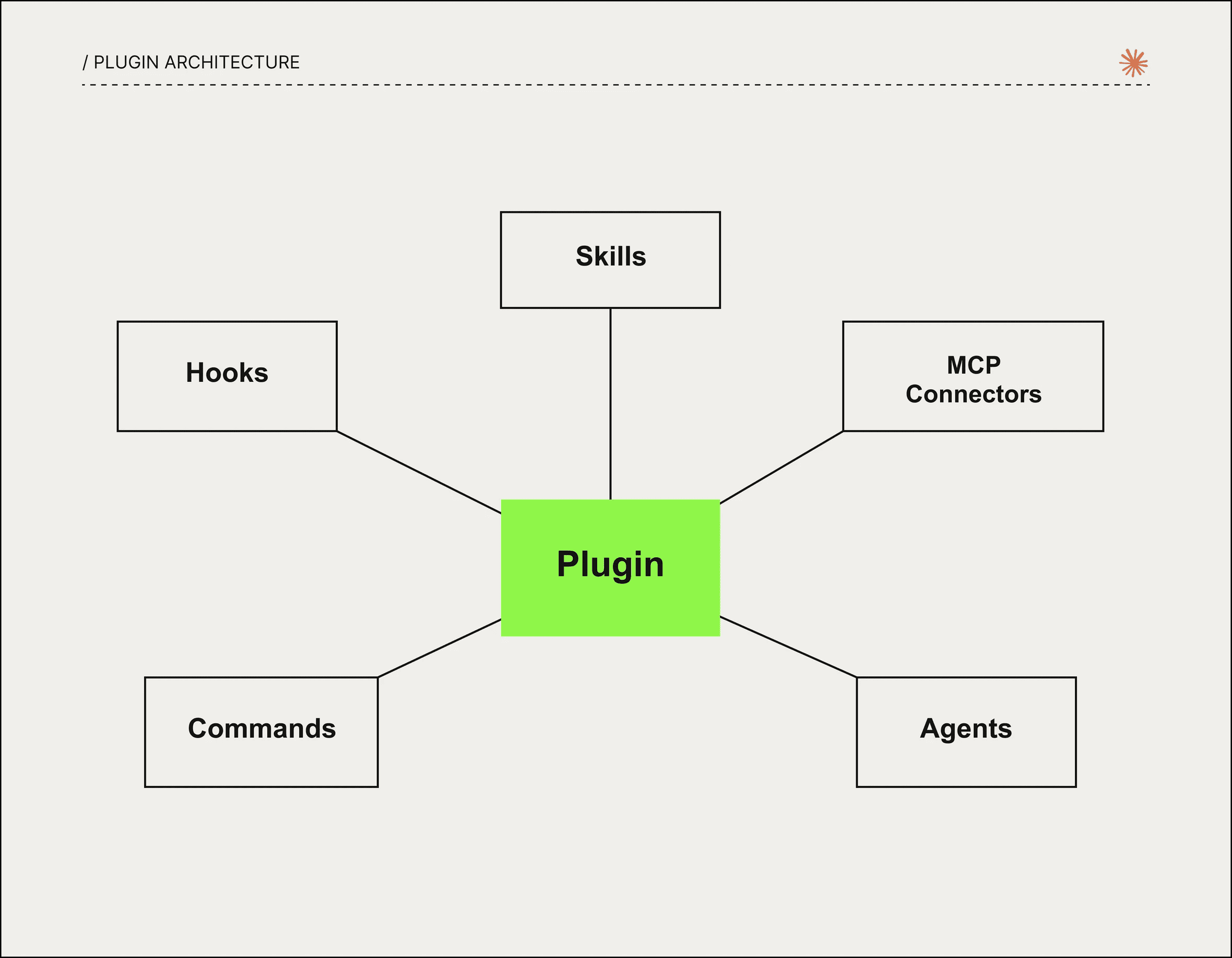
A plugin can contain one or more components. That’s what makes them flexible, and admittedly a little overwhelming at first glance.
1. Claude Skills
A skill is a markdown file with instructions for Claude. It doesn’t connect to external services or run code. It’s pure knowledge about how to write in a certain style, how to structure a document, which methodology to follow.
Think of a skill like an onboarding guide for a new employee that covers tone of voice, content style, and report templates.
Here’s an interesting data point. The most popular plugin in the Claude marketplace, with over 370,000 installs, is a single SKILL.md file about UI design. No integrations, no scripts. Just instructions.
2. Claude MCP Connectors
Claude MCP (Model Context Protocol) is the plumbing that connects Claude to external systems like GitHub, Slack, Notion, ClickUp, Figma, and Google Drive.
A connector lets Claude do more than talk about your data. It lets Claude actually work with it, pulling tasks from ClickUp, posting to Slack, or updating records in your CRM.
3. Sub-agents
An agent is a dedicated specialist you delegate a specific task to. It runs in isolation, keeps the main session context clean, and returns only the result.
For example, one agent runs a competitive analysis while another drafts a proposal, both working at the same time without getting in each other’s way. If you’re curious how AI agents differ from regular chat tools like ChatGPT, that’s worth reading before you build your first one.
4. Claude Slash Commands
These are shortcuts for launching repeatable workflows. Instead of typing out a long prompt every time, you just type /sales:prospect-research or /audit and Claude knows exactly what to do.
A useful community tip is to give your commands a shared prefix like /run-, so typing /run surfaces the full list at once.
5. Hooks
Hooks are automated scripts that fire in response to system events. They can run before a file is saved, after a command completes, or at the start of a session. They don’t need to be triggered manually and just happen in the background.
There’s also a sixth component type, LSP (Language Server Protocol), which handles intelligent real-time code completion. Primarily relevant for developers.
Plugin vs. Standalone Components: When to Use Which
All of these components can be configured without plugins, directly inside a project. That’s the standalone approach.
Standalone makes sense when you’re setting something up for a specific project or a team that already has access to the repo.
A plugin makes sense when you want to:
Share settings with teammates who aren’t working in that project
Publish a tool for a wider audience
Have a single, one-click installable package
The Claude Plugin Marketplace: Where to Find Ready-Made Solutions
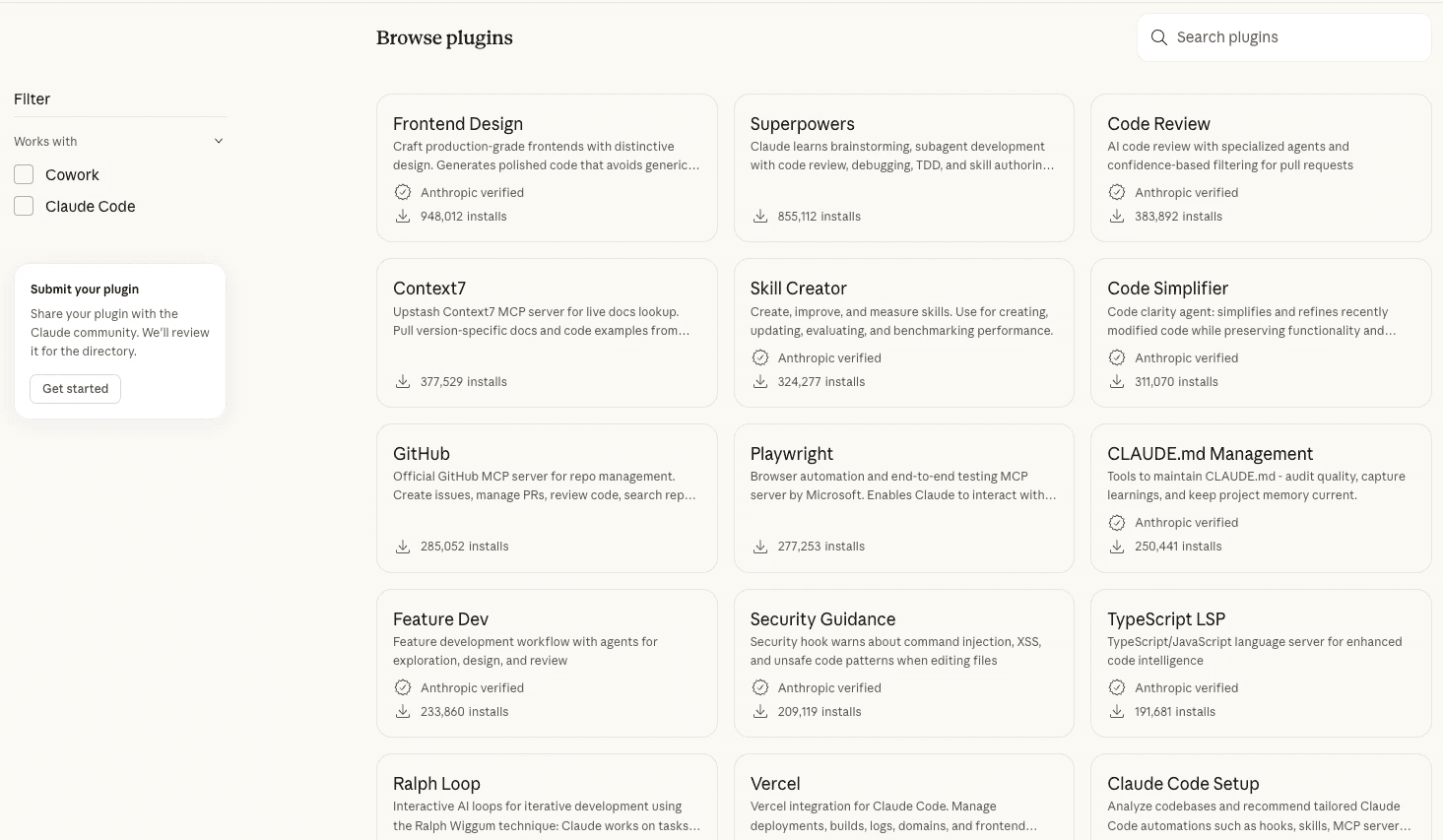
Anthropic launched an official Claude plugin marketplace at claude.com/plugins. It already features 11+ plugins built by the Anthropic team:
Plugin | What It Does |
|---|---|
Marketing | Content, campaigns, analytics |
Sales | Prospect research, call prep |
Productivity | Tasks, calendar, daily workflows |
Finance | Financial models, analysis |
Legal | Document review, risk assessment |
Product Management | Specs, roadmaps |
Data | Queries, visualization |
Beyond the official ones, there’s a community marketplace with plugins from developers around the world. There are lots of interesting options, but approach with caution. A plugin from an unknown author could contain malicious code.
Only install plugins verified by Anthropic or from authors you trust. A plugin with access to your tools is a serious level of trust to hand over.
Claude Plugins for Project Management in ClickUp
One of the most practical uses for Claude plugins is project management, and ClickUp is where this combination really clicks.
With the right plugin setup, Claude can read your ClickUp tasks, summarize project status, flag blockers, draft task descriptions, and route work to the right people, all from a single conversation. Instead of switching between tools and manually copying context, you describe what you need and Claude handles the rest inside your existing workspace.
For teams already using ClickUp automations to manage delivery, Claude plugins add an intelligence layer on top: they can interpret unstructured requests, decide which automation to trigger, and generate content that feeds directly into your tasks or docs.
If you want to see what this looks like in practice, our CEO Rodion published a library of ready-made Claude skills on GitHub that you can install and adapt for your own ClickUp workflows.
How to Create a Claude Plugin
The easiest way is to ask Claude to do it for you, right inside Cowork.
Open Cowork and ask Claude to help you create a new plugin
Claude will ask a few questions about what you want to automate, who will use it, and what services to connect
Describe your workflow in as much detail as possible. More context means better results
Claude generates the plugin structure, skills, and commands
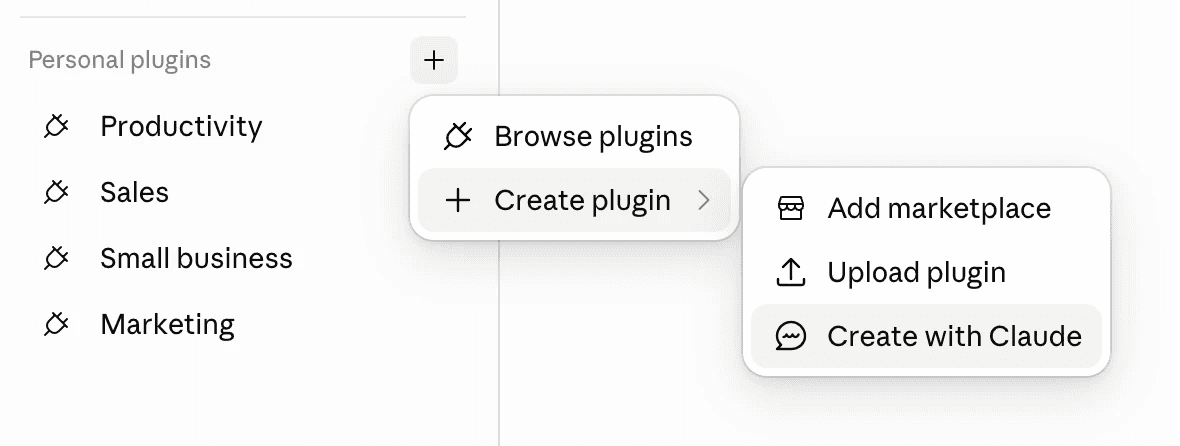
The finished plugin will appear under Customize → Plugins. You can edit it anytime through natural conversation, no code needed.If you’re more technical and want to understand how a plugin is structured under the hood, Claude Code plugins can be built manually through the terminal and published to the marketplace.
Plugins in Cowork vs. Claude Code
Plugins are supported across two products.
Claude Code is for developers. It gives full control over structure, CLI commands for installation (claude plugin install <name>), and the ability to publish to the marketplace.
Cowork is for everyone else. A visual interface, dialogue-based setup, and parallel task execution. A plugin installs and runs without a single line of code.
Plugins are available on the Pro, Max, Team, and Enterprise plans.
Need Help Getting Set Up?
Building a plugin from scratch, or figuring out which components your workflow actually needs, can take time. If you’d rather skip the trial and error, Byte&Kite is a Claude-certified implementation partner. We help teams design and deploy custom Claude integrations, from building plugins and skills to connecting your existing tools through MCP.
Learn more about our Claude integration services →
Wrapping Up
Claude plugins turn a general-purpose tool into a specialist built around your work. They’re made up of skills (instructions), connectors (service integrations), agents (autonomous executors), commands (shortcuts), and hooks (automations).
The best place to start is the official marketplace. Find a plugin that fits your role, install it, and try it out. Once you have a sense of what’s missing, ask Claude to build a custom plugin tailored to your exact workflow.